
Used BMW inspection checklist
A used BMW can look good and drive well and still hide expensive problems. This checklist takes you through a viewing step by step: the paperwork, the walk-around, the test drive and what the car’s own computers can tell you.
Before you go
- Ask for the VIN, the service history and recent inspection certificates, so you can read them before the viewing.
- Ask the seller not to start the car before you arrive, so you can hear a cold start.
- Plan the viewing in daylight and dry weather. Rain and darkness hide paint and body damage.
- Bring a phone with BimmerInspect and a compatible OBD adapter. Which adapter do I need?
Paperwork
- Check that the VIN on the documents matches the one on the car, for example the plate visible through the windscreen.
- Go through the service history and invoices: regular oil changes, spark plugs, brake fluid and any larger repairs.
- Compare the mileage on inspection certificates and invoices. It should only ever go up.
- Ask how many previous owners there were and why the car is being sold.
Walk-around
- Bodywork: uneven panel gaps, paint that differs from panel to panel and overspray on rubber seals point to repairs.
- Tyres: matching brands, even wear and the production date on the sidewall. Uneven wear can point to alignment or suspension problems.
- Brakes: deep grooves or a lip on the discs mean they will need replacing soon.
- Under the bonnet and under the car: oil or coolant leaks, and the fluid levels.
- Inside: wear on the steering wheel, seats and pedals should match the mileage. Try the windows, sunroof, lights, climate control and screens.
Cold start and test drive
- Listen to the first seconds after a cold start for rattles or rough running.
- Check that no warning lights stay on once the engine is running.
- Drive for at least 15 minutes, including some faster roads, so the engine and gearbox are fully warm.
- Gear changes should be smooth, without jerks, slipping or delays.
- The car should brake in a straight line, and the steering shouldn’t pull to one side. Listen for knocks over bumps.
What the car’s computers can show
Many of the things that matter most can’t be seen on a walk-around or felt on a test drive. A BMW’s control units keep records of them, and BimmerInspect reads those records with an OBD adapter and your phone. The best moment is right after the test drive, while the engine is still warm.
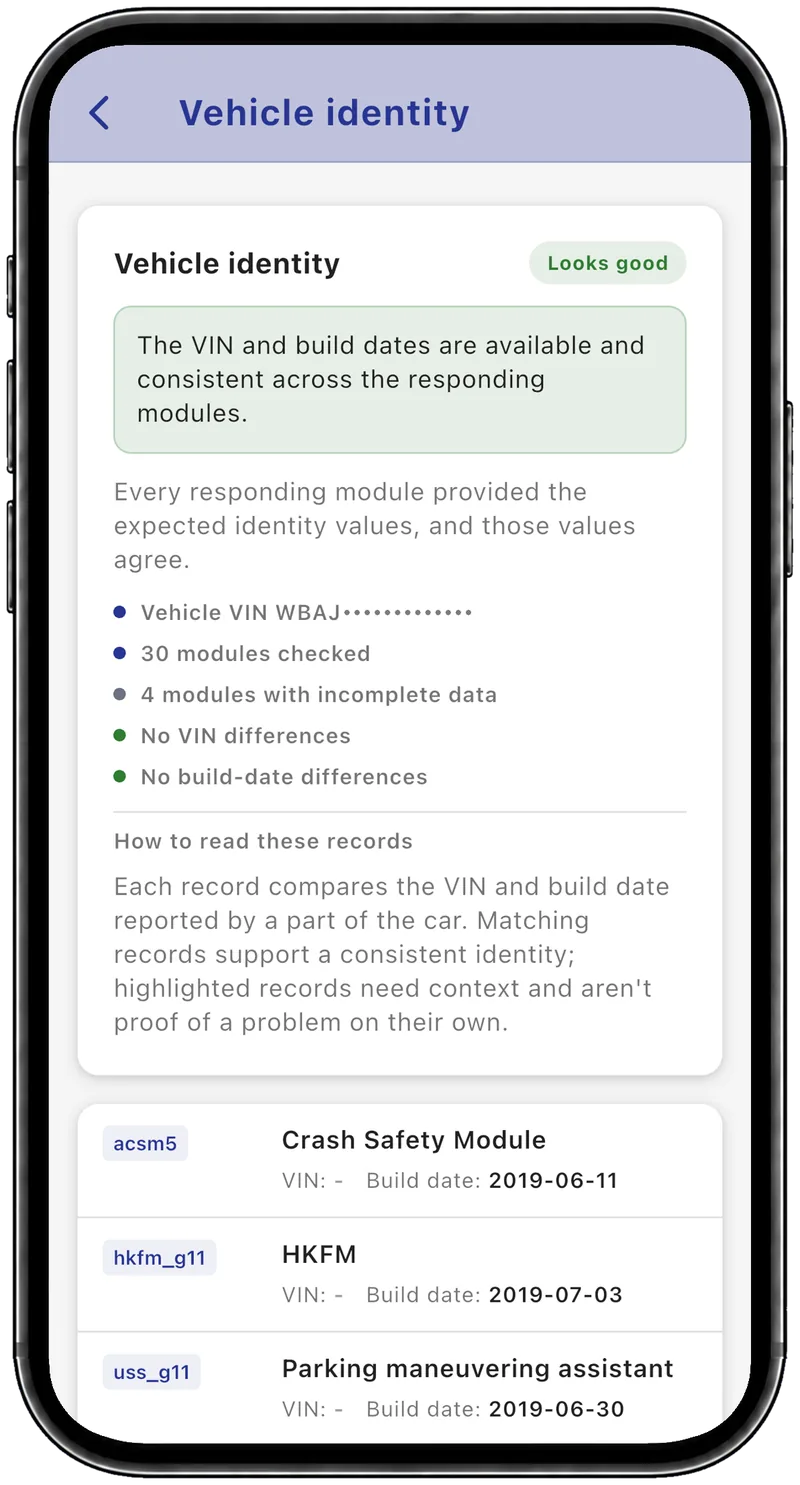
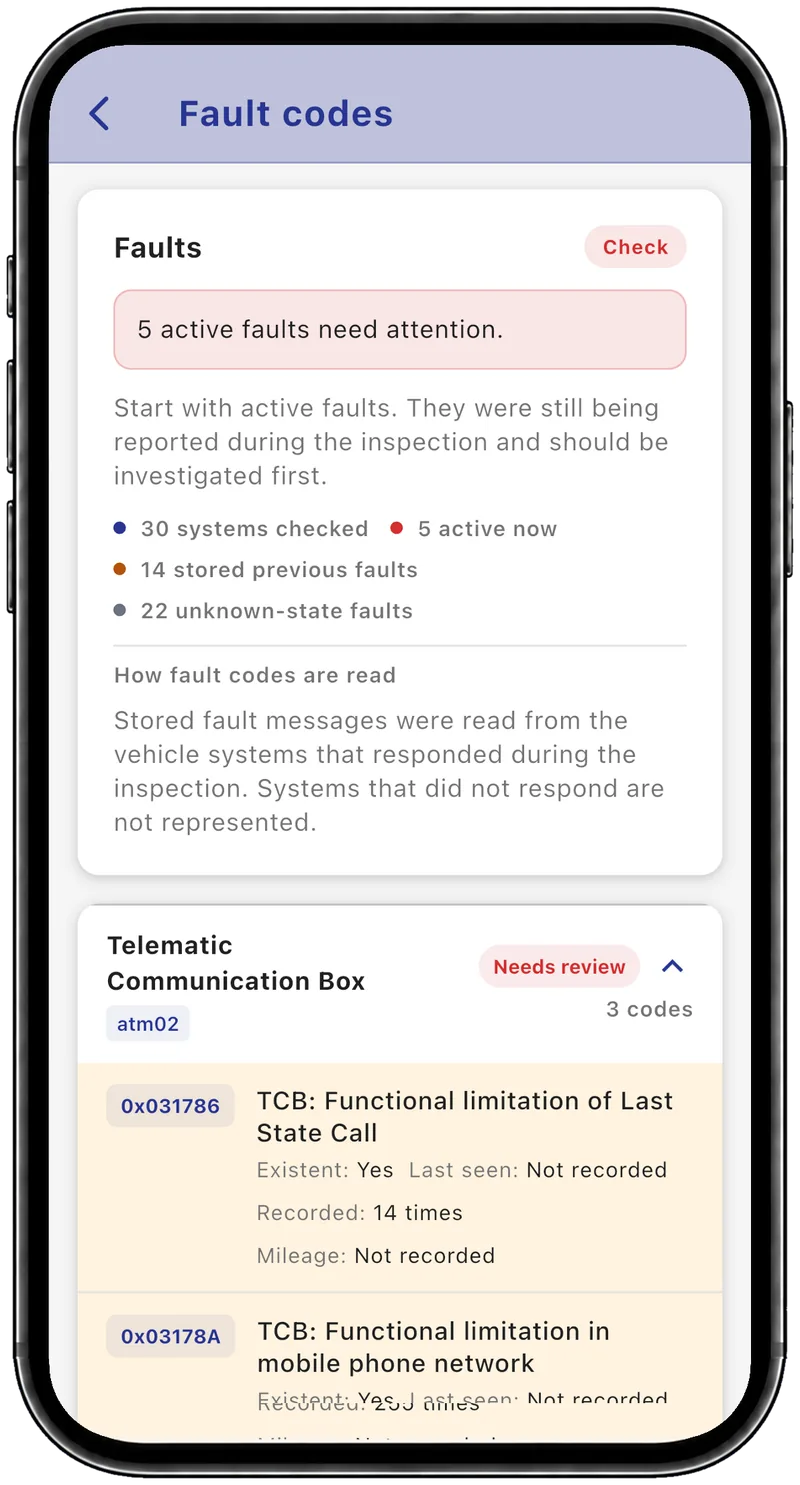
Depending on the car, the report covers:
- Vehicle identity: whether the VIN and build dates agree across the car’s modules. How to check if a BMW’s control units were replaced
- Fault codes: active and stored faults in every system that responds.
- Mileage: readings stored in many control units, compared with the dashboard. How to check if a BMW’s mileage is real
- Engine: cylinder smoothness, misfires, camshaft timing and valve control. How to check a BMW petrol engine’s health
- Gearbox: adaptation values and clutch fill times, which show early signs of wear. How to check a BMW automatic gearbox
- High-voltage battery on plug-in hybrids and electric cars: state of health and cell balance. How to check a BMW plug-in hybrid’s battery health
- Usage history: how the car was driven, including cold starts, hard use and time spent at temperature.
Check it yourself
- After the test drive, park with the engine idling and plug a compatible OBD adapter into the port under the dashboard.
- Open BimmerInspect and connect to the adapter.
- Run the free inspection and wait until the app confirms the engine is warm and idling, so no engine checks are skipped. It reads every system that responds and shows how much data the car provided.
- Unlock the full report to see every result and what it means, with a PDF you can share.
What each car provides depends on the model, engine and equipment, and the free inspection shows it before you pay anything. The full report is a one-time purchase for that car, with no subscription.
If something doesn’t look right
- Ask the seller about it, and ask for the invoices of any repairs.
- Share the PDF report with a specialist workshop so they know where to start.
- Have the car inspected by a specialist before you decide.
Frequently asked questions
Does an app replace a pre-purchase inspection?
No. It reads what the car’s computers know, which you can’t see or feel on a viewing. A workshop checks what electronics can’t, such as rust, leaks, suspension and brakes. The two work best together.
When should I run the inspection?
Right after the test drive, with the engine warm and idling. Some engine checks only run at warm idle.
Which cars does it work on?
Selected BMW and MINI models on the F and G platforms. What each car provides depends on the model, engine and equipment.
What do I need?
A phone with BimmerInspect and a compatible OBD adapter. No workshop visit and no account.
What is free, and what do I pay for?
Running the inspection is free and shows how much data your car provided. The results, what they mean and the PDF are in the full report, which you unlock with a one-time purchase for that car. There is no subscription.
Start with a free inspection
BimmerInspect reads this information from your car with an OBD adapter and your phone. The inspection is free; the results are in the full report, a one-time purchase.
For iPhone and iPad. Android coming later.